MedAid fits the record system you already have.
No vendor has to do anything first, and there is no integration to wait for. Choose how closely you want to join them up: copy and paste, drag and drop with the browser extension, or a full integration over our API.
Choose how closely you want to join them up
All three give you the same notes and the same account. What differs is how much happens automatically, and who has to do something for it to work.
Nothing to install, nothing to agree. Works with record systems that are not web pages either.
- Copy the whole note, or one section at a time
- MedAid counts which sections you have taken
- NAV forms copy field by field
- No IT involvement
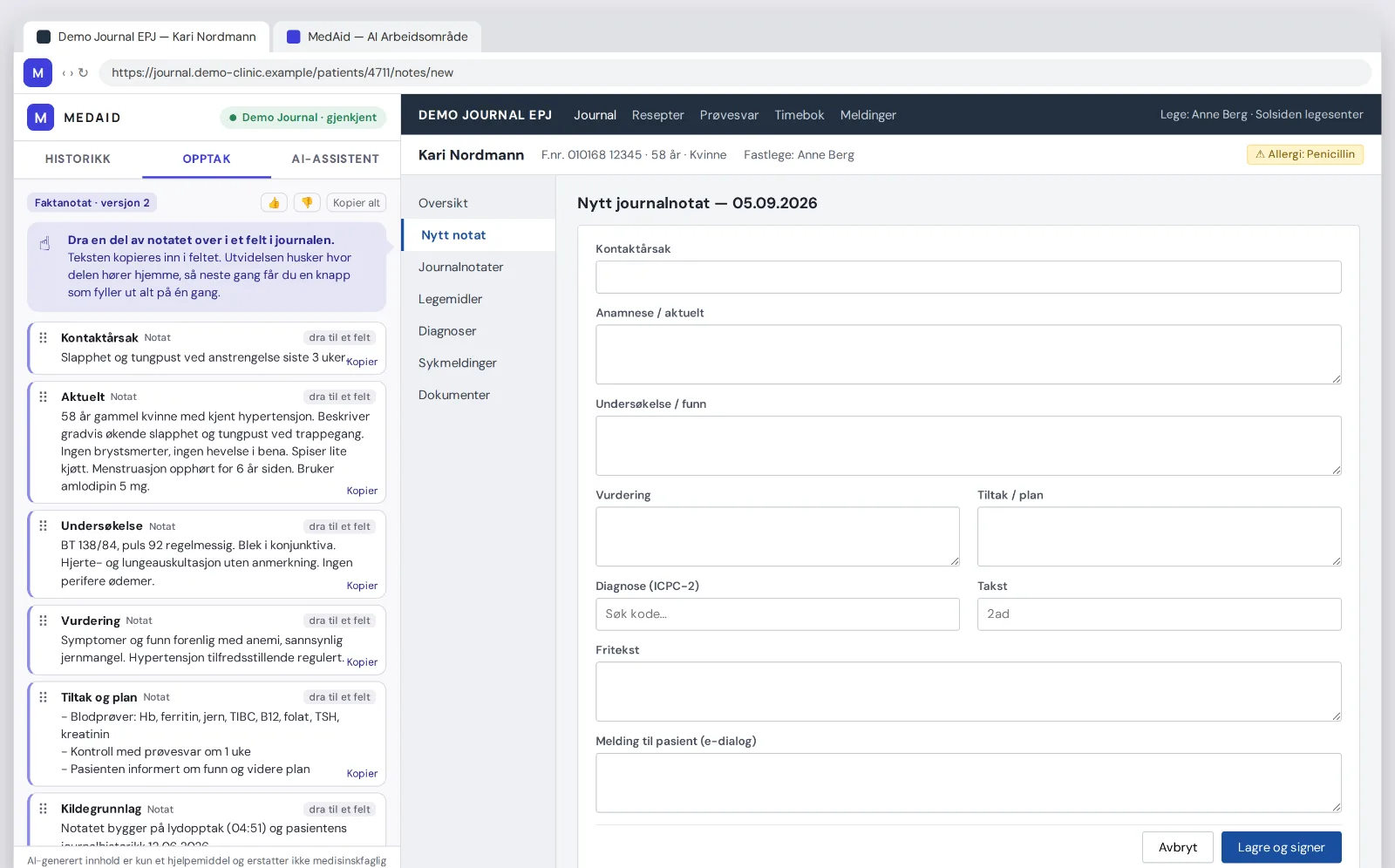
MedAid in a side panel next to the record. You drag the text where it belongs, and the extension remembers.
- Works with any record system that runs in the browser
- Your record vendor has to do nothing
- It learns the fields from you, not from us
- One click fills everything from the second consultation
- Can be rolled out centrally in Chrome and Edge
For record vendors and other software that want MedAid as part of their own product.
- Recording, notes, assistant and documents over HTTP
- Sign in as the clinician, or as a vendor
- Answers stream as they are written, with citations
- A published contract and a try-it console for developers
The extension and the API are not alternatives. The extension is how a clinic gets the benefit now, before their record vendor has built it in.
Four steps, once
Chrome or Edge. It uses the same login as medaid.no — the extension has no account and no password of its own.
Press the M icon and "Use MedAid on this page" once. The panel docks beside it.
Start the recording in the panel. When the note is ready, drag a section into the right field. The text is copied in; if the field already has text, the new text goes below it.
The extension remembered where that section belongs. From the second consultation you get a Fill button that places everything. You read it through and press your record system's own Save.
Works with any record system that runs in the browser
There is no code in MedAid for your record system. The extension writes into ordinary web form fields, and you are the one who teaches it where things go, by dragging there the first time.
So no vendor has to do anything, and nothing breaks the next time they move a field. You are in charge, and you can reset what you have taught it whenever you like.
One caveat, stated plainly: this only works when the record system is a web page in Chrome or Edge. If it runs as its own program or inside Citrix, you still get the recording, the note and a Copy button on every card — but drag and fill cannot reach into that window.
The extension or the website?
The extension is the short route while you are with the patient: recording, the clinical note, one-click changes, referrals and NAV forms, the assistant with its sources — and drag and drop straight into the record.
The website is the whole toolbox. That is where you set up templates, trigger phrases, sources and referral rules, and where video consultations, pre-visit questionnaires and clinic administration live.
You do not have to choose. Same account, same consultations — start in the extension and open the website when you need to set something up.
What the extension does not do
One rule governs the rest: the extension reads nothing from the record system, and MedAid receives nothing that identifies the patient.
Not the patient's name, not the national ID number, not the contents of any field. It does not know who the patient is.
It writes into a field when you drag something there, or when you press Fill for fields you taught it yourself.
Your record system's own buttons are the review step. You decide what enters the record.
Notes and transcripts live in MedAid, and in the record once you save. The extension keeps only where the cards belong, which is not patient data.
It does not ask for access to all pages, and it reads no network traffic, no cookies and no clipboard.
It runs as you, with the same login as the website. No vendor account, no shared user.
Simple to roll out
One package that works in both. Most Norwegian practices run Edge.
Can be pushed to the whole clinic by Chrome or Edge policy, with nothing for the doctors to install.
Your record vendor has to do nothing, and there is nothing to maintain when they change a screen.
The BankID session from medaid.no. No new accounts to administer.
The extension has no read rights in the record. It writes, and only where the doctor asks it to.
The extension is another way into MedAid, not a new data processor. Your existing agreement covers it.
Common questions
Does it work with our record system?
- Yes, if it is a web page you open in Chrome or Edge. There is no list of supported systems, because none is needed — you teach it where the fields are by dragging there the first time.
What if our record system is not a web page?
- Then drag and fill cannot reach into that window. You still get the recording, the note, referrals and NAV forms in the panel, with a Copy button on every card.
Does MedAid see my patient?
- No. The extension reads nothing from the record, and every consultation is sent with a random reference. MedAid cannot tell that two consultations belong to the same person.
Where do I get it?
- Sign in at medaid.no and go to Browser extension in the menu. That is where you install it, and where you see whether it is already in place.
Can our record vendor build it in themselves?
- Yes. We publish an API contract covering recording, notes, the assistant and documents, with a try-it console for their developers. Get in touch and we will get them started. The extension can be used in the meantime.
Do I have to choose between the extension and the website?
- No. Same account, same consultations. Use the extension while you are with the patient, and the website when you set up templates, video or pre-visit questionnaires.
How would it fit with you?
Tell us which record system you use and we will say which route fits, and help you get started.
Contact us